sidebar_position: -1
slug: /configure_knowledge_base
Configure knowledge base
Knowledge base, hallucination-free chat, and file management are the three pillars of RAGFlow. RAGFlow's AI chats are based on knowledge bases. Each of RAGFlow's knowledge bases serves as a knowledge source, parsing files uploaded from your local machine and file references generated in File Management into the real 'knowledge' for future AI chats. This guide demonstrates some basic usages of the knowledge base feature, covering the following topics:
Create a knowledge base
Configure a knowledge base
Search for a knowledge base
Delete a knowledge base
Create knowledge base
With multiple knowledge bases, you can build more flexible, diversified question answering. To create your first knowledge base:
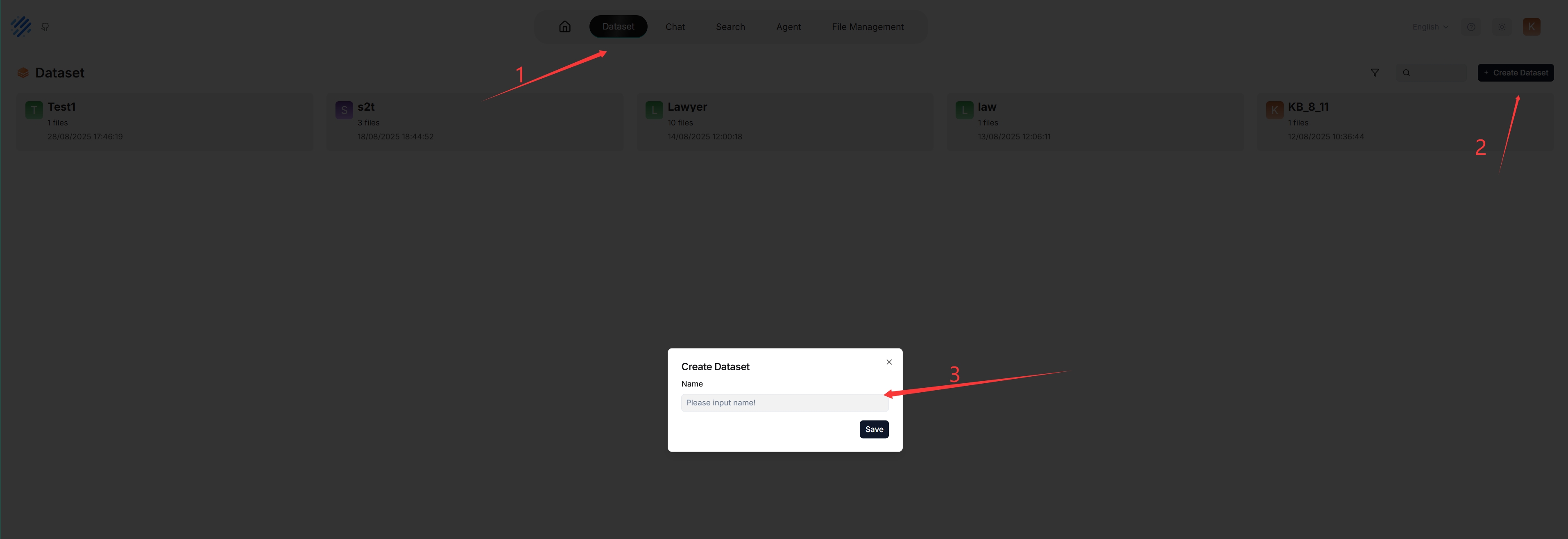
Each time a knowledge base is created, a folder with the same name is generated in the root/.knowledgebase directory.
Configure knowledge base
The following screenshot shows the configuration page of a knowledge base. A proper configuration of your knowledge base is crucial for future AI chats. For example, choosing the wrong embedding model or chunking method would cause unexpected semantic loss or mismatched answers in chats.
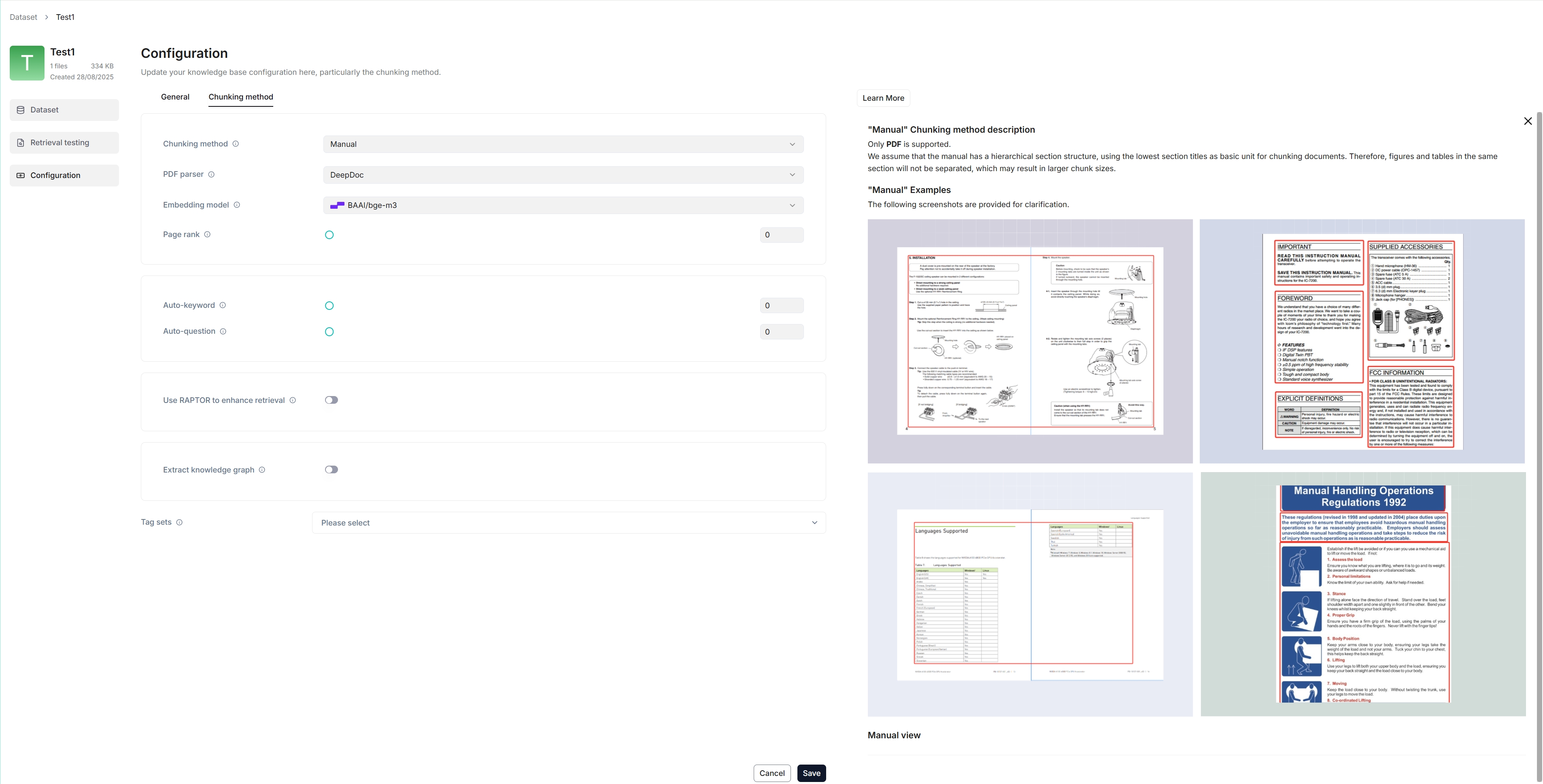
This section covers the following topics:
Select chunking method
Select embedding model
Upload file
Parse file
Intervene with file parsing results
Run retrieval testing
Select chunking method
RAGFlow offers multiple chunking template to facilitate chunking files of different layouts and ensure semantic integrity. In Chunking method, you can choose the default template that suits the layouts and formats of your files. The following table shows the descriptions and the compatible file formats of each supported chunk template:
Template | Description | File format |
|---|---|---|
General | Files are consecutively chunked based on a preset chunk token number. | MD, MDX, DOCX, XLSX, XLS (Excel 97-2003), PPT, PDF, TXT, JPEG, JPG, PNG, TIF, GIF, CSV, JSON, EML, HTML |
Q&A | XLSX, XLS (Excel 97-2003), CSV/TXT | |
Resume | Enterprise edition only. You can also try it out on demo.ragflow.io. | DOCX, PDF, TXT |
Manual | ||
Table | XLSX, XLS (Excel 97-2003), CSV/TXT | |
Paper | ||
Book | DOCX, PDF, TXT | |
Laws | DOCX, PDF, TXT | |
Presentation | PDF, PPTX | |
Picture | JPEG, JPG, PNG, TIF, GIF | |
One | Each document is chunked in its entirety (as one). | DOCX, XLSX, XLS (Excel 97-2003), PDF, TXT |
Tag | The knowledge base functions as a tag set for the others. | XLSX, CSV/TXT |
You can also change a file's chunking method on the Datasets page.
Select embedding model
An embedding model converts chunks into embeddings. It cannot be changed once the knowledge base has chunks. To switch to a different embedding model, you must delete all existing chunks in the knowledge base. The obvious reason is that we must ensure that files in a specific knowledge base are converted to embeddings using the same embedding model (ensure that they are compared in the same embedding space).
The following embedding models can be deployed locally:
BAAI/bge-large-zh-v1.5
maidalun1020/bce-embedding-base_v1
:::danger IMPORTANT
These two embedding models are optimized specifically for English and Chinese, so performance may be compromised if you use them to embed documents in other languages.
:::
Upload file
RAGFlow's File Management allows you to link a file to multiple knowledge bases, in which case each target knowledge base holds a reference to the file.
In Knowledge Base, you are also given the option of uploading a single file or a folder of files (bulk upload) from your local machine to a knowledge base, in which case the knowledge base holds file copies.
While uploading files directly to a knowledge base seems more convenient, we highly recommend uploading files to File Management and then linking them to the target knowledge bases. This way, you can avoid permanently deleting files uploaded to the knowledge base.
Parse file
File parsing is a crucial topic in knowledge base configuration. The meaning of file parsing in RAGFlow is twofold: chunking files based on file layout and building embedding and full-text (keyword) indexes on these chunks. After having selected the chunking method and embedding model, you can start parsing a file:
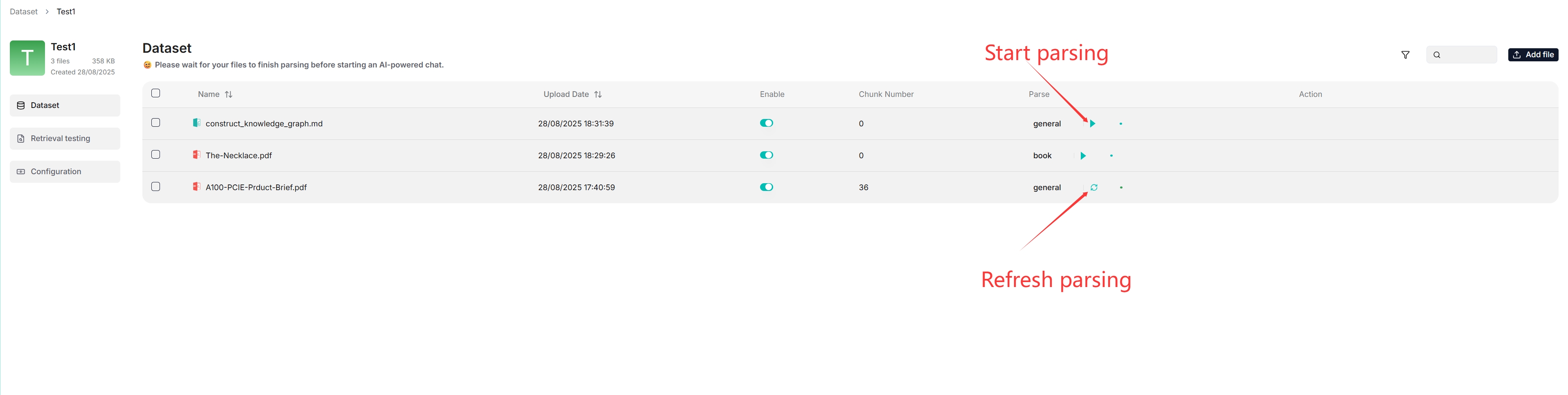
As shown above, RAGFlow allows you to use a different chunking method for a particular file, offering flexibility beyond the default method.
As shown above, RAGFlow allows you to enable or disable individual files, offering finer control over knowledge base-based AI chats.
Intervene with file parsing results
RAGFlow features visibility and explainability, allowing you to view the chunking results and intervene where necessary. To do so:
Click on the file that completes file parsing to view the chunking results:
You are taken to the Chunk page:
Hover over each snapshot for a quick view of each chunk.
Double-click the chunked texts to add keywords, questions, tags, or make manual changes where necessary:
:::caution NOTE
You can add keywords to a file chunk to increase its ranking for queries containing those keywords. This action increases its keyword weight and can improve its position in search list.
:::
In Retrieval testing, ask a quick question in Test text to double-check if your configurations work:
As you can tell from the following, RAGFlow responds with truthful citations.
Run retrieval testing
RAGFlow uses multiple recall of both full-text search and vector search in its chats. Prior to setting up an AI chat, consider adjusting the following parameters to ensure that the intended information always turns up in answers:
Similarity threshold: Chunks with similarities below the threshold will be filtered. By default, it is set to 0.2.
Vector similarity weight: The percentage by which vector similarity contributes to the overall score. By default, it is set to 0.3.
See Run retrieval test for details.
Search for knowledge base
As of RAGFlow v0.20.5, the search feature is still in a rudimentary form, supporting only knowledge base search by name.

Delete knowledge base
You are allowed to delete a knowledge base. Hover your mouse over the three dot of the intended knowledge base card and the Delete option appears. Once you delete a knowledge base, the associated folder under root/.knowledge directory is AUTOMATICALLY REMOVED. The consequence is:
The files uploaded directly to the knowledge base are gone;
The file references, which you created from within File Management, are gone, but the associated files still exist in File Management.
